


Hey, I’m Moodish.
Tell me what you feel like eating. Try “chewy smoky chaap” or give me everything at once: “spicy Chinese, non-veg, under ₹450.”
Moodish Enterprise
Private response
You’re invited to a team meal
Loading the lunch brief…
Finalists are ready
Moodish
Moodish concierge
Dish, texture, weather, energy. Say as much or as little as you know.
Tell me what you feel like eating. Try “chewy smoky chaap” or give me everything at once: “spicy Chinese, non-veg, under ₹450.”
I’m checking the time of day so I can make the first question useful.
Choose once, or include these details in your message.
Your plan
Searching availability around your selected address
Moodish Enterprise
A manager sets the policy. Employees respond privately. Moodish builds one efficient, approval-ready plan.
Launch a lunch to create the private response link.
Coverage, budget, quantities, and trade-offs are visible before any cart change.
Optional Instamart round
Workplace app adapters
Each adapter starts the same private enterprise workflow. Public channels see progress and aggregate coverage, never individual dietary or allergy details.
/moodish starts the lunch; teammates open a private form.Adapter ready · app credentials required
/moodish. Set its Request URL to https://moodish.sankalpjha.dev/api/platforms/slack/events.SLACK_SIGNING_SECRET.https://moodish.sankalpjha.dev/api/platforms/slack/oauth/callback, then install SLACK_CLIENT_ID and SLACK_CLIENT_SECRET in the Myprod runtime env file./moodish easy team lunch in a test channel.The channel receives safe progress plus a private preference link. The manager button uses Slack identity to protect approval access.
Product + engineering reference
This page documents what Moodish does today, which calls are conditional, and which capabilities are deliberately not implemented.
The web experience, workplace adapters and Moodish MCP share one agent service. Fixture and live data are normalized before the same ranking engine.
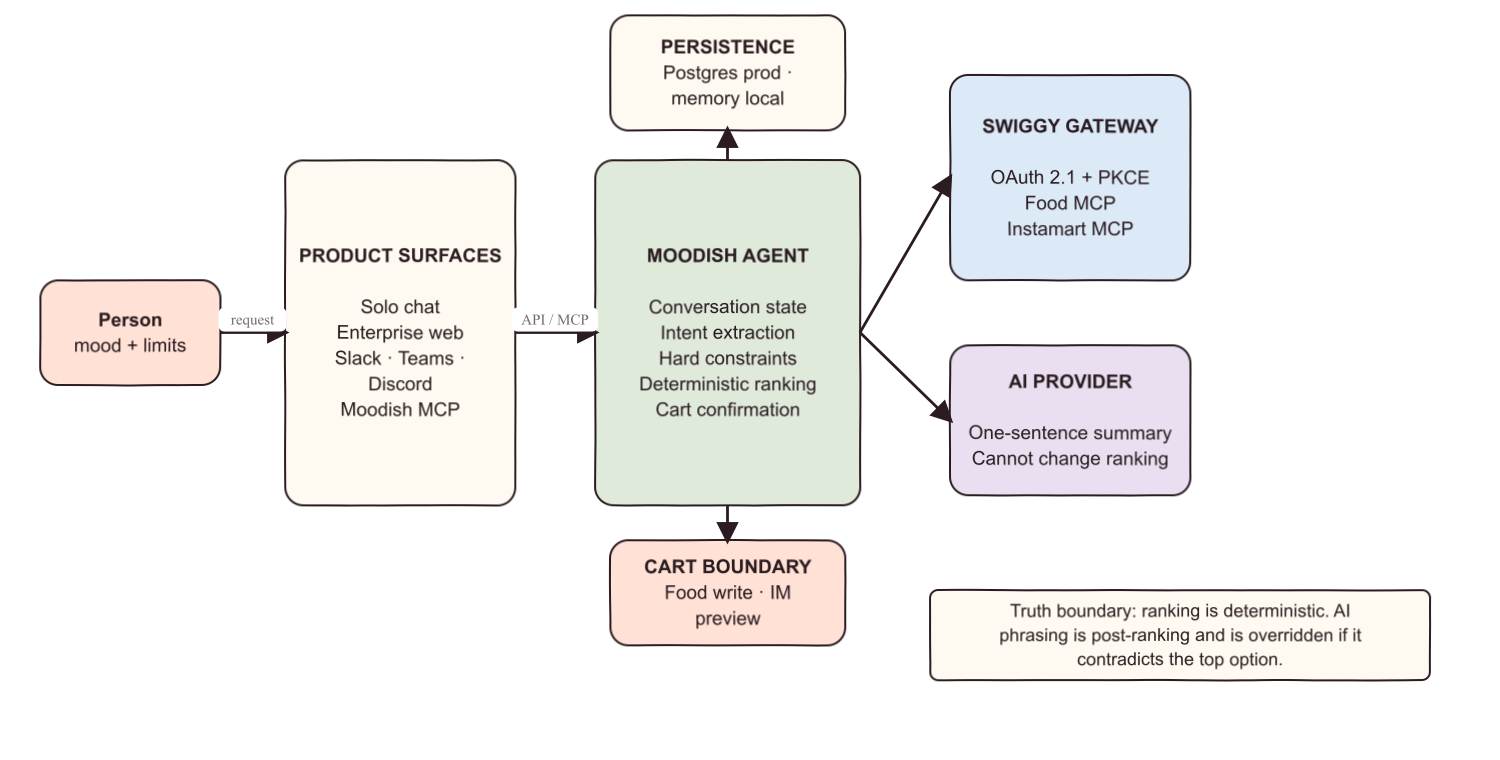
Solo chat, enterprise dashboard, private participant link, Slack/Teams/Discord adapters and Moodish MCP tools.
Conversation state, intent extraction, hard constraints, ranking, recommendation trace and confirmation gates.
PostgreSQL when DATABASE_URL is configured; process-memory fallback for local fixture runs. Stores profiles, confirmed plans and group sessions.
Solo asks only for missing hard fields. Enterprise gathers sensitive constraints privately and exposes aggregate coverage to the manager.
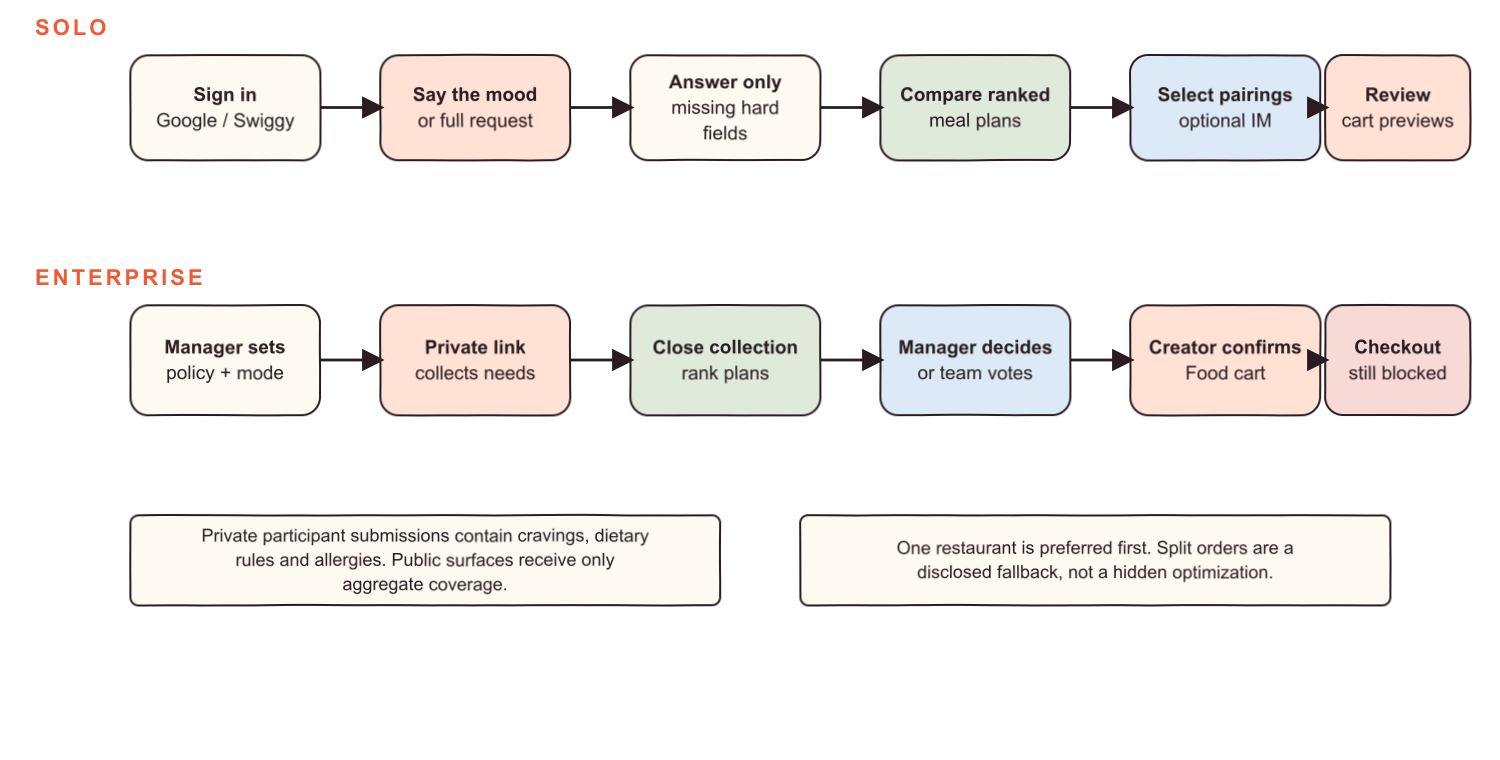
solomood → clarify diet/budget → discover → rank → select → optional Instamart preview → explicit Food cart confirmation
enterprisepolicy → private preferences → lock → rank → manager/vote/automatic → creator confirms Food cart
The language model extracts structured craving semantics, recognises edits to an active plan, and writes friendly copy. It does not select Swiggy tools, apply dietary filters, mutate carts or set ranking scores.
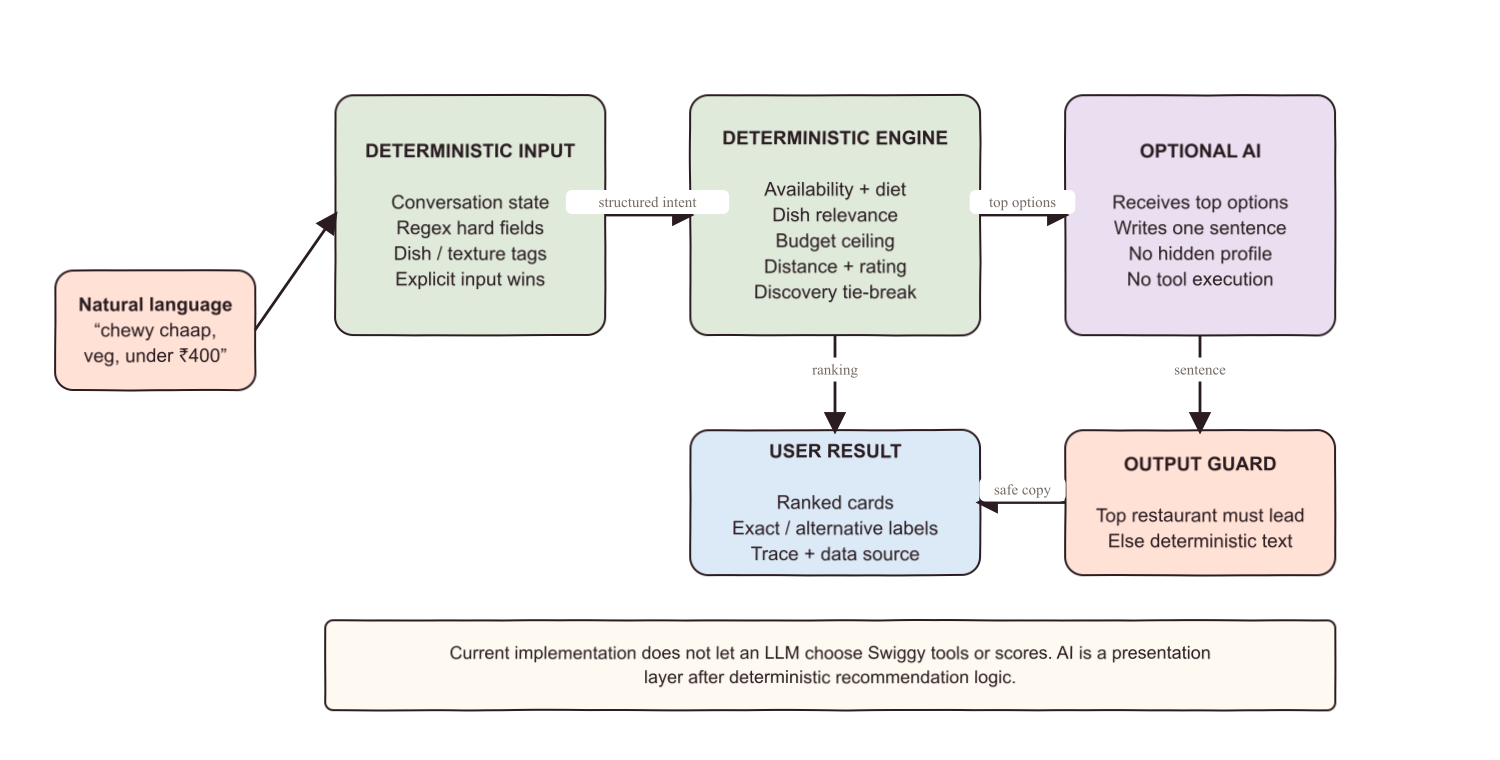
AI intent is schema-constrained and then validated; a deterministic extractor remains available during provider failure. If the AI summary contradicts ranking, Moodish replaces it. Current request, dietary rules and availability always outrank model phrasing, profile history or discovery preference.
These names and argument shapes are taken from the current gateway implementation. Every applicable discovery and cart call carries the selected addressId.
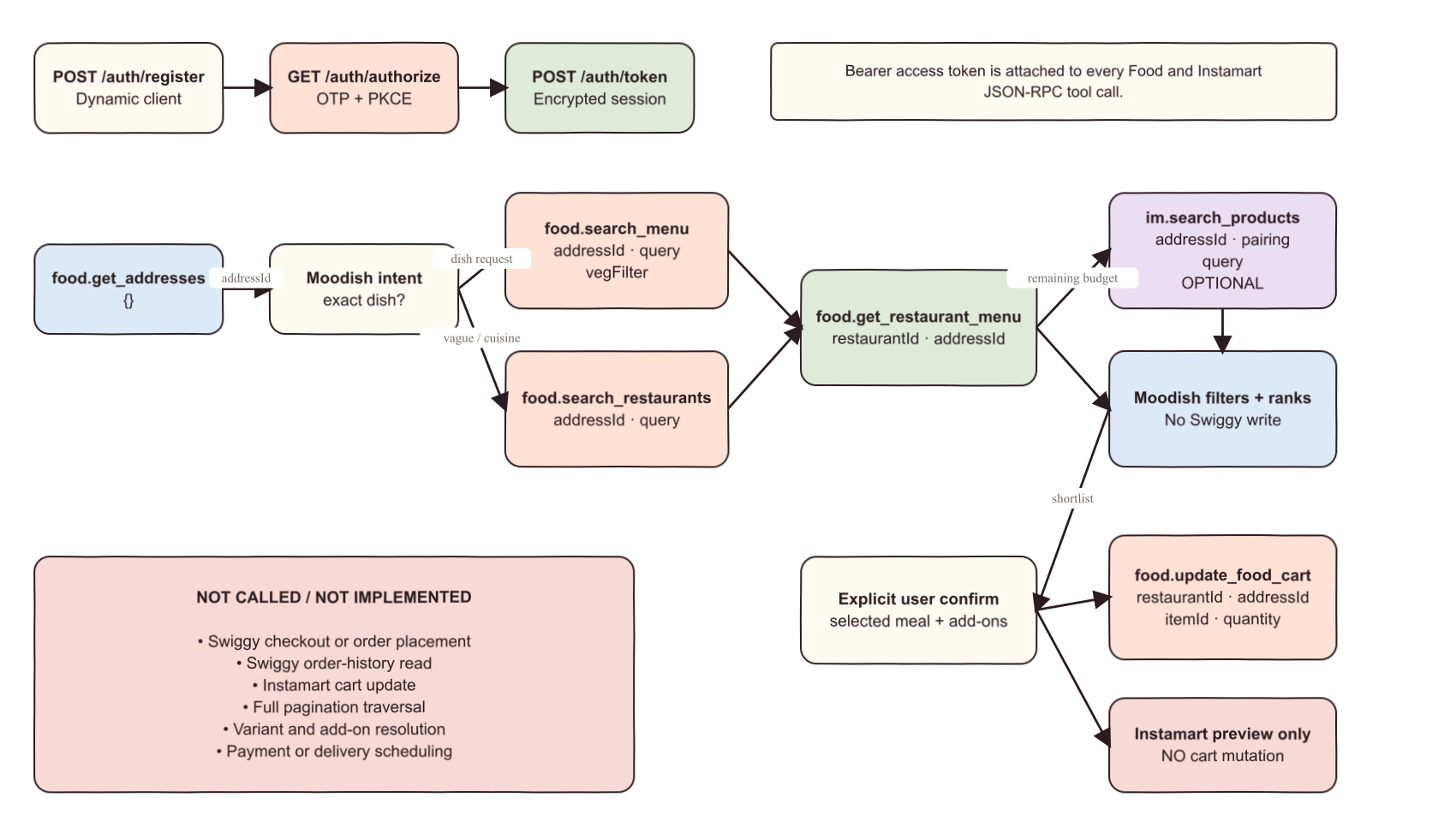
| When | Server / tool | Arguments sent | Effect |
|---|---|---|---|
| First Swiggy connect | POST /auth/register | redirect URIs, client metadata | Dynamic Client Registration |
| OTP consent | GET /auth/authorize | client_id, redirect, state, PKCE challenge | User authorization |
| Callback | POST /auth/token | authorization code, verifier, redirect | Encrypted access-token session |
| Start planning | food · get_addresses | {} | Read saved delivery addresses |
| Explicit dish | food · search_menu | { addressId, query, vegFilter } | Exact dish search; may run again for a labelled alternative |
| Vague mood / cuisine | food · search_restaurants | { addressId, query } | Restaurant discovery; a broad empty query is a last candidate-pool fallback |
| Candidate hydration | food · get_restaurant_menu | { restaurantId, addressId } | Read menu and current availability |
| Optional pairings | im · search_products | { addressId, query } | Read Instamart products; no cart write |
| After explicit approval | food · update_food_cart | { restaurantId, addressId, items: [{ itemId, quantity }] } | Mutates Food cart only |
POST https://mcp.swiggy.com/food
Authorization: Bearer <encrypted-session-token>

{
  "jsonrpc": "2.0",
  "method": "tools/call",
  "params": {
    "name": "search_menu",
    "arguments": { "addressId": "...", "query": "chaap", "vegFilter": 1 }
  }
}
Transport retries rate limits, 5xx responses and transient upstream failures up to four attempts. Expired or invalid OAuth sessions require reconnection.
Recommendation quality is ordered by hard constraints first. Profile history is deliberately weak context.
Context rules create search queries such as Chinese → chilled drink, biryani → raita and spicy food → cooling drink. Results must be available and fit remaining budget.
Stores confirmed Food items plus selected Instamart preview items and totals. It is not proof that a Swiggy order was placed or delivered.
Food and Instamart remain different fulfilment flows. Today only the Food cart has a mutation tool in Moodish.
A capability is not presented as live until its schema and authenticated staging journey pass.